
Table of Contents
Running a small hotel, guest house or B&B comes with plenty of software terminology. Property management systems, booking engines and channel managers are often discussed together—and sometimes presented as though they were interchangeable.
They are not.
A property management system (PMS) helps you manage reservations and day-to-day hotel operations. A booking engine allows guests to book directly through your website. A channel manager distributes rates and availability across online travel agencies and returns reservations to your system.
Modern hotel platforms often bundle these functions together, which can make the distinction less obvious. However, understanding what each function does is important when deciding what your property actually needs.
The answer depends less on room count than on how you operate: where bookings come from, how many people use the system, which tasks must be coordinated and how much administration you want to automate.
PMS vs Booking Engine vs Channel Manager: Quick Comparison
| Tool | Main purpose | You are likely to need it when… |
|---|---|---|
| Property Management System | Manages reservations, guests and internal operations | Several people handle bookings or stays, or manual administration is becoming difficult |
| Booking Engine | Accepts direct online reservations through your website | You want guests to check availability and book without contacting you first |
| Channel Manager | Synchronises availability, rates and reservations across external booking channels | You sell rooms through more than one OTA or distribution channel |
A property may need one, two or all three functions. The question is not simply how many rooms you have, but which parts of the operation must remain connected.
Property Management System (PMS)
A PMS is the operational centre of a hotel. It brings reservation information, guest records and day-to-day tasks into one system.
Depending on the platform, a PMS may include:
- a reservation calendar;
- check-in and check-out tools;
- guest profiles and stay history;
- room allocation and status;
- housekeeping coordination;
- deposits, invoices and folios;
- payments;
- reporting;
- staff permissions;
- communication or task-management tools.
A PMS becomes particularly useful when more than one person needs reliable access to the same information. Reception staff may need to see arrivals and payments, cleaners may need current room statuses, and managers may need occupancy and revenue reports.
It can also reduce dependence on spreadsheets, handwritten notes and information held by one person.
However, a PMS does not automatically provide every distribution or direct-booking function. Some systems include a booking engine and channel manager, while others connect to separate products.
A PMS may be valuable when:
- several staff members handle reservations or guests;
- housekeeping information must be shared;
- deposits, balances or additional charges are difficult to track;
- guest history matters;
- reporting is becoming more important;
- the property sells packages or additional services;
- manual processes are creating errors or consuming too much time.
A PMS is therefore not only for large hotels. A small property with complicated workflows may benefit from one more than a larger property with a straightforward operation.
Booking Engine
A booking engine is the part of the system that allows guests to reserve directly through your website.
It normally enables guests to:
- enter their dates;
- see available rooms and rates;
- select packages or extras;
- provide contact details;
- pay or guarantee the reservation;
- receive an immediate confirmation.
The booking engine usually appears behind the hotel’s Book Now button, although the booking process may open in a separate window or hosted page.
Direct bookings avoid the OTA commission attached to that particular reservation, although they are not entirely cost-free. You may still pay for the booking engine, payment processing, website maintenance and marketing.
A good booking engine should work smoothly on mobile devices, display clear policies and make the booking process feel trustworthy. It should also pass the reservation into the PMS or central calendar without requiring staff to enter it manually.
The booking experience should also feel like a natural continuation of the hotel website. Colours, branding, room descriptions, photography and policies should remain consistent, whether the booking engine is embedded in the site or opens on a hosted page. A sudden change in appearance, confusing navigation or a poorly adapted mobile layout can interrupt the guest journey and reduce confidence at the point of booking.
A booking engine may be valuable when:
- you want guests to book outside reception hours;
- your website receives relevant traffic;
- reducing OTA dependence is a priority;
- telephone and email enquiries create unnecessary administration;
- you want to sell packages, upgrades or extras directly;
- guests expect immediate confirmation;
- you want a smoother journey from browsing the hotel website to completing a reservation.
A booking engine cannot create demand by itself. Guests still need to find your website, trust the property and see a convincing reason to book directly.
For smaller properties wanting to combine their website and direct-booking setup, Lodgify is an interesting option, with a website builder, booking engine and online payment tools in one platform. Read our Lodgify Review.
For practical ways to improve the guest journey without paid advertising, see How to Improve Direct Bookings Without Ads.
Channel Manager
A channel manager connects your property to external sales channels such as Booking.com, Expedia, Airbnb and regional or specialist booking sites.
It sends supported rates, availability and restrictions to connected channels and returns reservation information to the property’s system. When a room is booked through one connected channel, the remaining availability can be updated across the others.
This reduces the need to sign in to several extranets and change inventory manually.
A channel manager may be valuable when:
- you sell rooms through several OTAs;
- the same inventory appears on more than one booking channel;
- rates or restrictions change regularly;
- staff spend time updating multiple extranets;
- a delayed update could cause an overbooking;
- you want to test additional distribution channels.
A channel manager greatly reduces the risk of conflicting availability, but it cannot guarantee that overbookings will never happen. Incorrect room mapping, connection failures, delayed updates and manual errors can still create problems.
💬 Real Experience:
I have experienced what a double booking means at reception: two guests arriving for the same room and staff having to find alternative accommodation for one of them.
The problem is not limited to an awkward conversation. It can involve additional costs, unhappy guests, disrupted staff and reputational damage during an already busy period.
A reliable channel manager cannot remove every possible cause of an overbooking, but it can eliminate much of the repetitive manual updating that makes them more likely.
A channel manager can also make it easier to test and manage a broader mix of booking sources. See Beyond OTAs: How to Diversify Your Booking Channels for a fuller channel strategy.
How a PMS, Booking Engine and Channel Manager Work Together
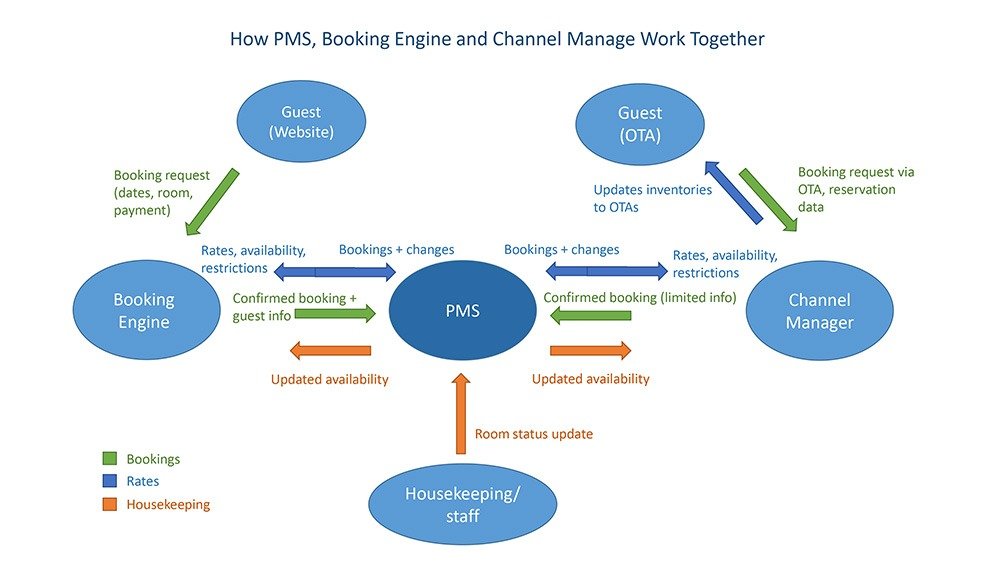
Each function has a different role:
PMS: The Operational Record
The PMS holds the reservation and gives staff the information needed to manage the stay. It may contain guest details, payments, room allocation, housekeeping status, messages and additional charges.
Booking Engine: The Direct Sales Channel
The booking engine displays live availability and rates on the property’s website. When a guest books, the reservation is passed into the PMS or reservation calendar.
Channel Manager: The Distribution Connection
The channel manager communicates with OTAs and other external booking channels. It distributes supported rates, availability and restrictions, then returns new or changed reservations.
In a typical connected setup:
- The property updates availability, rates or restrictions.
- The channel manager distributes the relevant information to connected booking sites.
- A guest books through the hotel website or an external channel.
- The reservation enters the PMS or central calendar.
- The remaining availability is updated across the connected channels.
- Staff use the PMS to manage the guest’s arrival, stay, payments and departure.
Housekeeping information generally helps staff understand whether a departed room is ready for the next arrival. It should not be confused with booking availability, which is determined by the property’s reservation inventory.
Why Hotel Software Labels Can Be Confusing
The three functions are distinct, but they are not always sold as three separate products.
Some platforms combine a PMS, booking engine and channel manager under one login. Cloudbeds and Little Hotelier currently promote integrated combinations of these functions. Other providers specialise more heavily in distribution or direct bookings and connect to an existing PMS; SiteMinder, for example, offers a channel manager and booking engine alongside PMS integrations.
Providers may also use broader names such as:
- hotel management system;
- hospitality platform;
- hotel commerce platform;
- front-desk system;
- reservation system;
- all-in-one booking system.
Do not rely on the product category alone. Confirm exactly which functions are included in the proposed package and which require a separate module, integration or subscription.
A platform described as a PMS may include distribution and direct-booking tools. Another may provide only operational functions and expect you to connect external products.
Which Tools Does Your Property Actually Need?
Room count provides some context, but it is not a reliable decision rule by itself.
A five-room guest house selling through several OTAs, accepting international payments and coordinating outsourced cleaners may have more complicated system needs than a twenty-room property receiving most bookings directly and operating with one experienced owner.
Start with the way the property works.
Do You Need a Booking Engine?
You probably need a booking engine when you want guests to complete direct reservations online.
A property that accepts only telephone or email enquiries can operate without one, but staff must then reply, confirm availability, collect details and enter the reservation manually. That may be manageable at low volumes, but it also creates delays and limits bookings outside working hours.
The more important direct sales are to the business, the more important the quality of the booking engine becomes.
Do You Need a Channel Manager?
You probably need a channel manager when the same rooms are offered through more than one external booking channel.
Manually updating one OTA may be manageable for a property with infrequent bookings. Updating several channels becomes riskier as occupancy, booking frequency and rate changes increase.
The decision should reflect distribution complexity, not only property size.
Do You Need a PMS?
You probably need a PMS when coordinating the stay has become more difficult than taking the booking.
Signs include:
- staff relying on notes or messages to share information;
- uncertainty about deposits or outstanding balances;
- repeated entry of the same reservation data;
- housekeeping updates not reaching reception;
- difficulty finding a guest’s history;
- inconsistent invoices or additional charges;
- inadequate reporting;
- too much operational knowledge depending on one person.
The value of a PMS lies in organising the operation, not simply storing reservations.
Common Operational Scenarios
| How the property operates | Likely scenarios |
|---|---|
| Owner-run B&B relying mainly on direct enquiries | Simple reservation management and perhaps a booking engine |
| Small property selling through several OTAs | Channel management, accurate availability and direct-booking tools |
| Hotel with several reception or housekeeping staff | PMS, staff access, operational workflows and reporting |
| Boutique property focused on direct sales | Strong booking engine, payments, guest communication and marketing connections |
| Property selling breakfast, restaurant services, activities or packages | PMS and integrations capable of handling additional charges and services |
| Growing or multi-property business | Scalable reporting, shared data, user permissions and centralised distribution |
Most properties will fit more than one description. Prioritise the needs that create the most work, risk or lost revenue in your own operation.
Integrated Platform or Separate Tools?
Advantages of an integrated platform
- fewer systems and logins;
- less duplicate data entry;
- more consistent reservation information;
- one principal support relationship;
- simpler reporting;
- fewer integration points to investigate.
Limitations of an Integrated Platform
- the bundled version of each tool may not be the strongest available;
- advanced functions may require additional packages;
- integrations may be limited to approved partners;
- moving away from one part of the platform may be difficult;
- the complete cost may be higher than the advertised entry price.
Advantages of separate tools
- greater freedom to choose specialist products;
- more flexibility to replace one component;
- access to particular features or distribution connections;
- the ability to retain an existing PMS that staff already know.
Limitations of Separate Tools
- more vendors and contracts;
- responsibility for checking integrations;
- inconsistent support when two systems fail to communicate;
- more complex reporting;
- duplicated settings or data.
An integrated platform is not automatically better, and separate tools are not automatically cheaper. The right arrangement is the one that creates the fewest operational gaps without adding unnecessary complexity.
Choosing the Right Setup
Before comparing providers, identify what the new system must improve.
Map the Important Workflows
Consider how your property handles:
- new reservations;
- amendments and cancellations;
- deposits and final balances;
- OTA availability;
- direct bookings;
- housekeeping;
- guest messages;
- additional services;
- reporting.
The most important requirements are often revealed by the tasks that currently consume the most time or produce the greatest risk.
Confirm How Information Moves
Ask providers to show what happens when:
- an OTA reservation arrives;
- a direct booking is made;
- a guest changes dates;
- a room is taken out of service;
- a rate or restriction changes;
- a payment fails;
- whether the booking engine matches the hotel website and works smoothly across mobile and desktop devices;
- an integration stops working.
Do not settle for being told that the systems “integrate.” Find out which information moves in each direction and whether updates are automatic.
Test Realistic Tasks
Guided demonstrations are common, while free trials depend on the provider and product. Ask to see your real workflows rather than relying on a standard presentation.
Involve the people who will use the system. Receptionists, housekeepers and managers may notice practical problems that are not obvious from a feature list.
Compare the Full Cost of the Proposed Setup
Ask:
What is the total cost of the complete package being proposed, and which services or features may be charged separately?
The answer should account for relevant modules, onboarding, support, integrations, payments and any transaction-based charges.
Put Your Priorities into Practice
Download the free Hotel System Evaluation Workbook (PDF) to define your operational needs, prepare questions for demonstrations and compare up to three systems side by side.
For a more detailed buying process, see How to Choose the Right Hotel Management System.
🔗 Why Integration Matters
Problems appear when reservation, distribution and operational systems contain different information.
Weak or incomplete connections can result in:
- inaccurate availability;
- missed or duplicated reservations;
- rates that differ between channels;
- manual re-entry of guest information;
- payment records that do not match reservations;
- incomplete reporting;
- delays in guest communication;
- uncertainty over which provider should resolve a problem.
Good integration does not eliminate every operational mistake, but it reduces the number of manual steps and gives staff a more reliable version of what is happening.
Connected systems also exchange substantial amounts of personal and payment-related information. See how modern hotel booking systems protect guest data.
For detailed provider recommendations, see Best Booking Systems for Small Hotels & B&Bs (2026).
For individual reviews and side-by-side comparisons, explore our Hotel Booking System Reviews.
Conclusion
A PMS, booking engine and channel manager solve different problems.
A booking engine allows guests to book directly through your website. A channel manager manages distribution and keeps connected booking channels updated. A PMS helps staff manage reservations, guests and day-to-day hotel operations.
Not every property needs all three as separate products. Many platforms combine them, while others allow hotels to select specialist tools and connect them.
Do not choose solely according to room count, advertised price or the number of features included. Choose the smallest workable setup that supports the way your property operates without leaving staff to compensate for gaps manually.
The best system is the one that keeps the right information connected and removes the operational problems costing your property the most time, confidence or revenue.
Frequently Asked Questions
What does a PMS do in a hotel?
A PMS helps manage reservations and hotel operations. Depending on the system, it may handle check-in and check-out, guest records, room allocation, housekeeping, billing, payments and reporting.
What is the difference between a booking engine and a channel manager?
A booking engine allows guests to reserve through the hotel’s own website. A channel manager connects the property to external booking channels and synchronises supported rates, availability and reservations.
Do I need both a booking engine and a channel manager?
You may need both when you want to accept direct website bookings and also sell through several OTAs. A property that does not use external booking channels may not need a channel manager, while a property that does not accept direct online reservations may not need a booking engine.
Can a PMS include a booking engine and channel manager?
Yes. Some hotel platforms bundle all three functions, while other PMS products rely on separate modules or integrations. Confirm what is included in the package being quoted. Cloudbeds and Little Hotelier are current examples of platforms presenting these functions as connected parts of a wider system.
Can a small B&B operate without a PMS?
Yes, when reservations and internal workflows are genuinely simple. A PMS becomes more valuable when manual administration, staffing, payments, housekeeping or reporting become difficult to coordinate. Room count alone does not determine the answer.
Does a channel manager prevent every double booking?
No. It considerably reduces the risk by updating connected channels automatically, but incorrect mapping, connection problems and manual changes can still cause errors. Cloudbeds’ current documentation describes channel managers as exchanging rates, availability, restrictions and reservations between the PMS and connected channels.
Is an all-in-one hotel system better than separate tools?
It may be simpler to operate and support, but it is not universally better. Separate tools can provide greater specialist depth or flexibility. Compare the quality of the individual functions, integrations, total cost and consequences of switching.
Related Guides
- Best Booking Systems for Small Hotels & B&Bs
- Hotel Booking System Reviews: Compare Options for Small Hotels & B&Bs
- How to Choose the Right Hotel Management System
- How to Increase Direct Hotel Bookings
- How Modern Hotel Booking Systems Keep Guest Data Secure
- Why Mobile-Friendly Booking Systems Matter for Small Hotels